Medevac by Code 1 Studios

When your Mac stops answering, bring it back.

Medevac checks on the Macs you look after and gives you a way back in when Screen Sharing goes quiet. Repair remote access, restart, ping and check health from another Mac, your iPhone, iPad or iPhone Duo, at home or from anywhere with Medevac Relay. No VPN needed.

Get Medevac

Version 1.0.13 (23)

For iPhone and iPad Coming soon

Mac: version 1.0.13 (23) · 14.7 MB zip · macOS 15 or later · Apple silicon and Intel. Signed with Developer ID and notarised by Apple. Unzip, then drag Medevac to Applications. Not on the Mac App Store.

Mac SHA-256: 2ddb97dbc350a9a550334ae02ee342fabb6426fa3c51d378fed093072fb790f4

Older OS: Medevac Legacy 1.0.13 (23) · 15.0 MB zip · a separate app for macOS 11 Big Sur to macOS 14 Sonoma · same features · works with the current Mac, iPhone and iPad apps · Apple silicon and Intel. Signed with Developer ID and notarised by Apple. Unzip, then drag Medevac Legacy to Applications.

Older OS SHA-256: 4f89fbc0ec10698fb84a8e1a09ac14ebc470e2f39acf012e5e1807a5287d6f76

New in Medevac for Mac 1.0.13 (23)

  • Software Update now shows your download speed while an update downloads, for example 6.8 MB of 14.7 MB · 46% · 2.4 MB/s.
  • Fixed a stray outline around Activity in the Software Update window.
  • Also in 1.0.13 (22): a redesigned menu bar menu, with status, server, mode, windows and help in their own groups and a small icon beside every item.
  • Also in 1.0.13: Force Quit from your iPhone, iPad or another Mac, a preview tile for every saved Mac, a welcome guide for choosing Server or Client mode, Medevac Relay for reaching your Mac from any network without Tailscale or a VPN, a Quality setting for the screen preview and Control (including Smart), a Software Update window that shows every stage, and the Code 1 Studios beacon at launch and in About.

Macs on 1.0.8 to 1.0.13 (22) update to 1.0.13 (23) by themselves within a day, or straight away with Check for Updates. Previous version 1.0.13 (22).

The Mac app downloads directly from this site. The iPhone and iPad app comes from the App Store, and the App Store link opens once it’s released. Privacy policy
Mac iPhone iPhone Duo iPad macOS 15+ iOS 18+
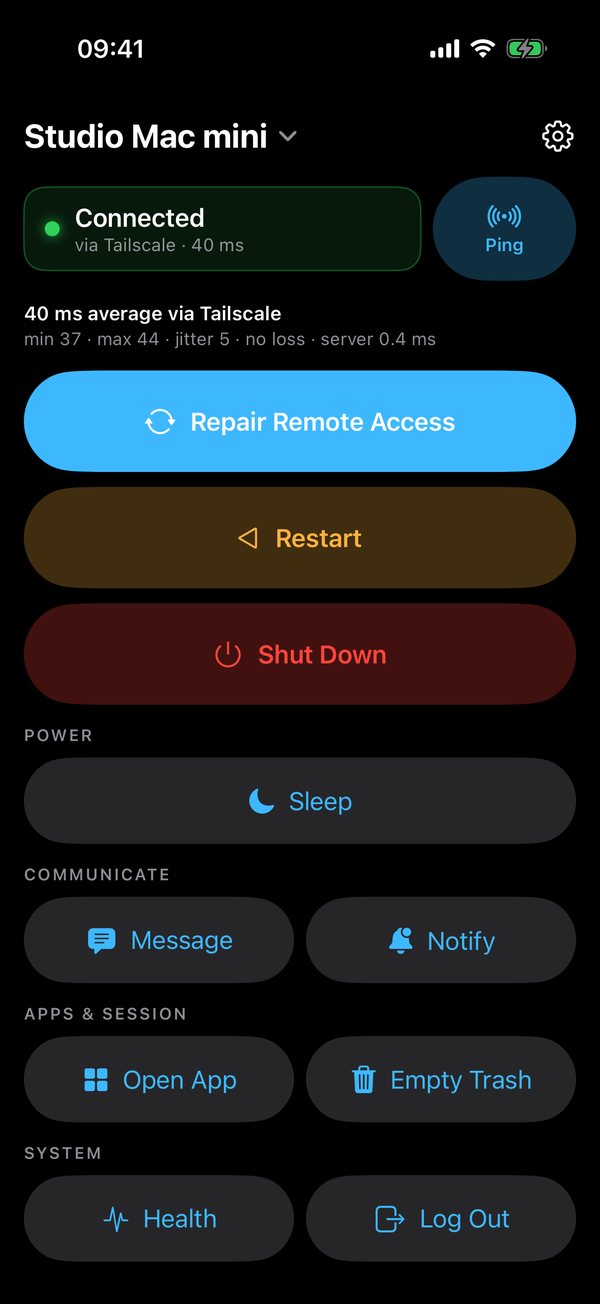
Medevac on iPhone showing Studio Mac mini connected via Tailscale, a 40 ms ping and the Repair Remote Access, Restart and Shut Down buttons
What’s inside

A rescue kit for the Macs you look after.

Run Medevac in Server mode on the Mac you want to look after, then reach it from another Mac, your iPhone or your iPad running in Client mode.

Repair Remote Access

When Screen Sharing stops responding, Medevac checks it, restarts its user-level helpers, checks again and tells you what happened.

Restart, shut down, sleep

Restart now or in 1 or 5 minutes, shut down, log out or put the Mac to sleep. Face ID or Touch ID is required before restarting, shutting down or logging out.

Ping

Five encrypted round trips with average, minimum and maximum time, jitter and loss. When a Mac is disconnected, Ping tests each known address on its own.

Health at a glance

Uptime, disk space, memory, power, Screen Sharing status and version numbers for the Mac you’re checking.

Finds your Macs

Macs on the same network appear automatically. Away from home, Medevac Relay reaches them from any network, or use Tailscale or another VPN. No router port forwarding.

Status you can trust

Medevac only shows Connected after the Mac proves it knows your shared secret, then checks in every 15 seconds. Otherwise it shows Connecting or Disconnected, with the reason.

Message and notify

Send an alert to whoever is at the Mac and see when it’s been read, or post a notification.

Open apps and empty Trash

Open an app from a list you approve on the server, and add several apps to that list at once. Empty Trash shows how many items are in it before you confirm.

Synced through your iCloud

Your list of Macs syncs across your devices through your own iCloud account. A Mac in Server mode can show itself on your other devices.

New in Medevac 1.0.7 · Mac now, iPhone soon

See its screen. Spot problems early.

Medevac 1.0.7 adds a view-only Screen Preview of the Mac you look after, and a warning with one-tap repair when remote access stops working. They’re in the Mac download now, and arrive on iPhone when 1.0.7 is on the App Store.

Screen Preview

See the server Mac’s main screen under the action tiles, on iPhone or on a Mac in Client mode. It’s view only, so nothing is clicked or typed on the Mac.

Full screen and its own window

On iPhone, tap the preview for full screen in landscape, then pinch or double-tap to zoom. On Mac, click it to open a window you can resize or make full screen.

Remote access warning

Medevac checks when it connects and every minute after. If Screen Sharing isn’t answering, it says so and offers Repair Now, which runs Repair Remote Access.

Quicker server setup

On the server Mac, click Finish setup to go straight to the sign-in settings, click an address under “Reach this Mac at” to copy it, and choose to start with the window hidden so the server runs from the menu bar.

See its screenA view-only preview of the Mac’s screen, right under the action tiles. Nothing is clicked or typed on the Mac.
Go full screenTap the preview to see it full screen in landscape. Pinch or double-tap to zoom.
Spot problems earlyIf Screen Sharing stops answering, Medevac warns you and offers Repair Now.
Your refresh rateLive, or every 1, 2, 5, 10 or 30 seconds, or Off. Every 2 seconds is the default.

The Mac desktop in these screenshots is a sample from the app’s demo mode. Screen Preview needs a one-time Screen & System Audio Recording permission on the server Mac; see Help.

Made for iPhone Duo

The Mac on one screen. Every action on the other.

Medevac runs natively on iPhone Duo and uses both screens. Half-folded, the remote Mac’s screen is on one side and everything from the Home page is on the other. Open it flat and the remote screen fills the whole inner display.

Half-folded: screen and controls

The remote desktop sits on one side of the fold, with Repair Remote Access, Restart, Ping, Insight and the rest of the Home page actions on the other, so you can watch the Mac while you work on it.

Fully open: the whole screen

Open it flat and the remote desktop takes over the large inner display, giving you far more of the Mac’s screen than a phone can show.

Folded: the full app

Closed, Medevac works on the outer screen just as it does on iPhone, with every action and your list of Macs.

Now on iPad

The whole Mac, on the big screen.

Medevac 1.0.13 runs natively on iPad with a full-screen layout of its own. The Mac you’re checking fills the top of the screen, every saved Mac sits in a row of live tiles underneath, and every action is in reach below. The iPad app is the same download as the iPhone app on the App Store.

A large live preview

See the server Mac’s screen across the top of the iPad, then tap to control it or expand it to full screen.

Every Mac in one row

Each saved Mac has its own preview tile, labelled with its name and a green or red dot for online or offline. Tap one to switch to it.

Every action at once

Control, Repair, Insights, Restart and Force Quit, plus Sleep, Message, Notify, Open App, Empty Trash, Shut Down and Log Out, all on one screen.

Screens

See it on Mac, iPad and iPhone.

On Mac

Main windowStatus, ping and every action for the selected Mac, including Wake for a sleeping Mac on the same network.
Server modeThe Mac you look after shows its addresses, connected devices and recent activity.
ServersEvery Mac you look after, synced through your iCloud, plus Macs found on this network.
HealthModel, macOS, uptime, load, memory, disk and Screen Sharing status.
SettingsChoose Client or Server mode and whether Medevac opens at login.
AppearanceLight, System or Dark, and six app icons that also change the Dock icon.
Built-in helpA full guide in its own window, with search.
AboutVersion 1.0 (2), with help, terms, support and privacy links.

On iPad

HomeThe Mac you’re checking across the top, a live tile for every saved Mac, and every action below.
Force QuitSee the apps running on the Mac with their CPU and memory use, and end a stuck one after you confirm.
InsightsLive CPU, memory, storage and GPU for the Mac you’re checking, then system details below.
Repair remote accessWhen Screen Sharing stops answering, a warning appears with Repair Now.
ServersEvery Mac you look after, synced through your iCloud, plus Macs found on this network.
AppearanceTheme, screen preview refresh and Control settings.
Built-in helpA searchable guide to every part of Medevac.

On iPhone

Your Mac at a glanceStatus, the latest ping and every action in one place: Repair Remote Access, Restart, Shut Down, Sleep, Message, Notify, Open App, Empty Trash, Health and Log Out.
Your serversEvery Mac you look after, with its status. The list syncs through your iCloud, and Macs on the same network appear on their own.
InsightLive CPU, memory, storage and GPU, with thermal, memory and Screen Sharing status at a glance.
Every drive at a glanceFree space on every volume, caches, downloads and Trash, plus live network traffic.
SettingsServers, saved passwords, appearance and help, with changes applied when you tap Apply.
AppearanceLight, System or Dark, and six app icons to choose from. Pulse Key is the default.
Built-in helpA searchable guide to how Medevac works, setting up the Mac you want to look after, the status colours, Tailscale and more.
AboutVersion 1.0 (2), with links to help, terms and support.
Add your first MacMacs on the same network appear on their own. Away from home, Medevac Relay reaches it from any network, or add it by its remote address.

Shown with demo data.

  • Challenge sign-inYour password is never sent. The server keeps only a PBKDF2 hash.
  • A key per deviceEach device gets its own key, kept in the Keychain. Revoke a device at any time.
  • Encrypted sessionsChaCha20-Poly1305 with fresh keys for every session.
  • LockoutFive failed sign-ins lock it for 30 seconds, then 1, 5 and 15 minutes.

Security

Sign in once. Every action stays encrypted.

You sign in to each Mac once with its username and password. After that, your device reconnects with its own key. Every command is encrypted between your devices, on your home network, over your own VPN, or through Medevac Relay, which passes along the encrypted session without being able to read it.

  • Face ID or Touch ID before Restart, Shut Down, Log Out and Empty Trash
  • No accounts, analytics, ads or tracking
  • Code 1 Studios collects nothing. Medevac Relay can’t read your sessions and keeps no logs of them

Read the privacy policy

How it fits together

One app, two roles.

Coming later

Next on the workbench.

These are planned and aren’t in the app yet.

Deeper repair

Restarting the system Screen Sharing service, and working before anyone logs in.

Saved Commands

A list of approved commands you set up on the server.

Wake from iPhone

Wake currently works from a Mac on the same network. Wake from iPhone is coming later.

Get Medevac.

Download version 1.0.13 for Mac from this site, or get the iPhone and iPad app on the App Store.

For iPhone and iPad Coming soon
Help guide Privacy policy Email support